Product Features How it works Pricing FAQ Sign in Start free
SoloChief Features

Everything you need to run the week with control.

Plan the week, protect today's focus, capture what changes, keep commitments moving and review what actually happened.

One operating rhythm. Web and pocket.

Most productivity tools wait for you to open them. SoloChief keeps the week moving by bringing the right focus, follow-up or reminder back to you.

A solo founder sits at a desk with a laptop, notebook and coffee, planning the week.
The operating system

One operating rhythm.
Four connected responsibilities.

Build a week the system can protect.

  • Weekly Plan
  • Main focus commitment
  • Three weekly outcomes
  • Stop List
  • Lock plan
Web Free

In practice: Lock this week's plan once the outcomes are set.
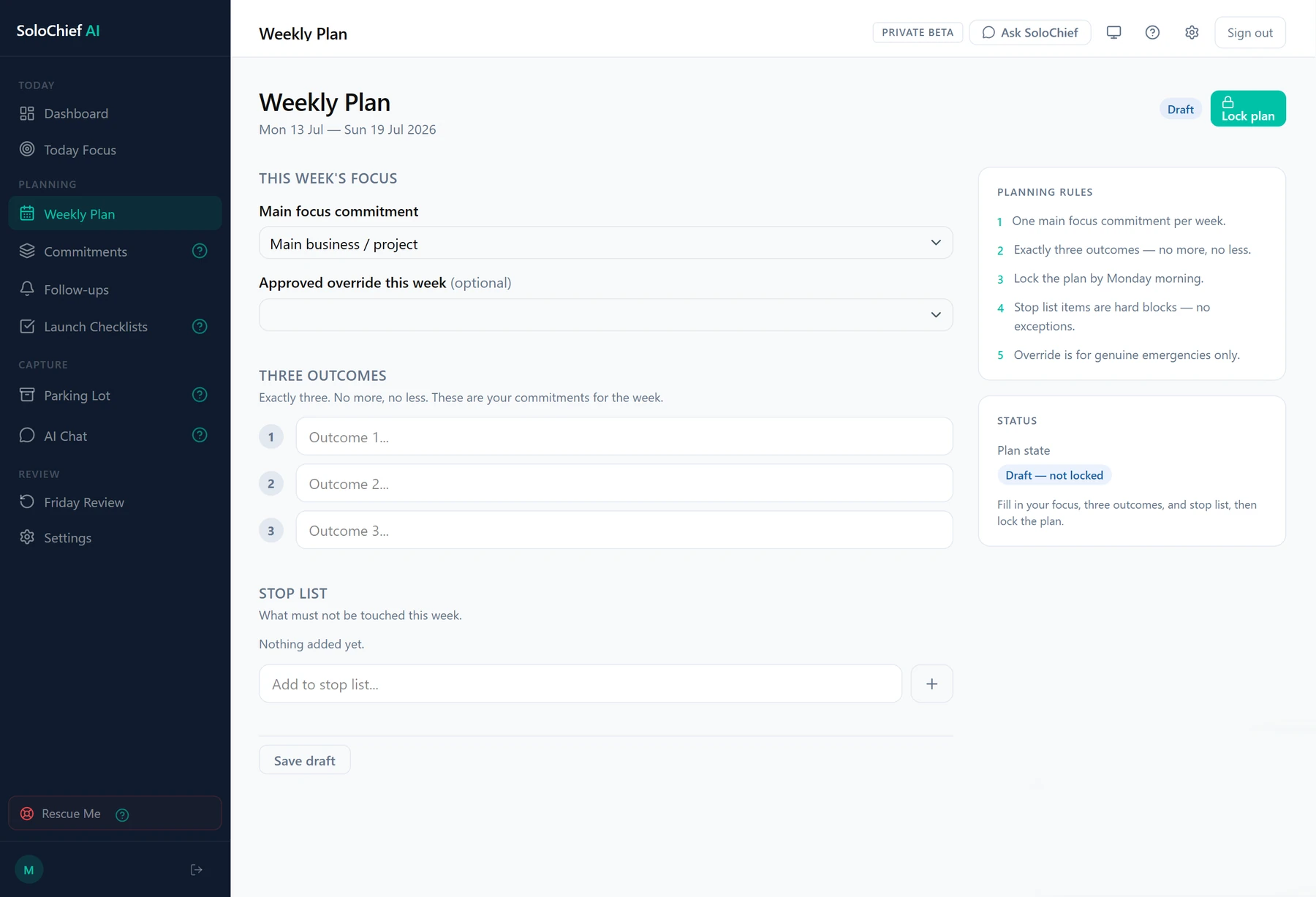
SoloChief Weekly Plan screen showing this week's main focus commitment, three outcome fields, an empty stop list, and the planning rules that keep the week to one focus and three outcomes

Keep one outcome clear while the day changes.

  • Today Focus
  • Switch Challenge
  • Blocked / partial / slipped updates
  • Parking Lot
  • Rescue Me
Web Free

In practice: Record when a new priority genuinely outranks today's outcome.
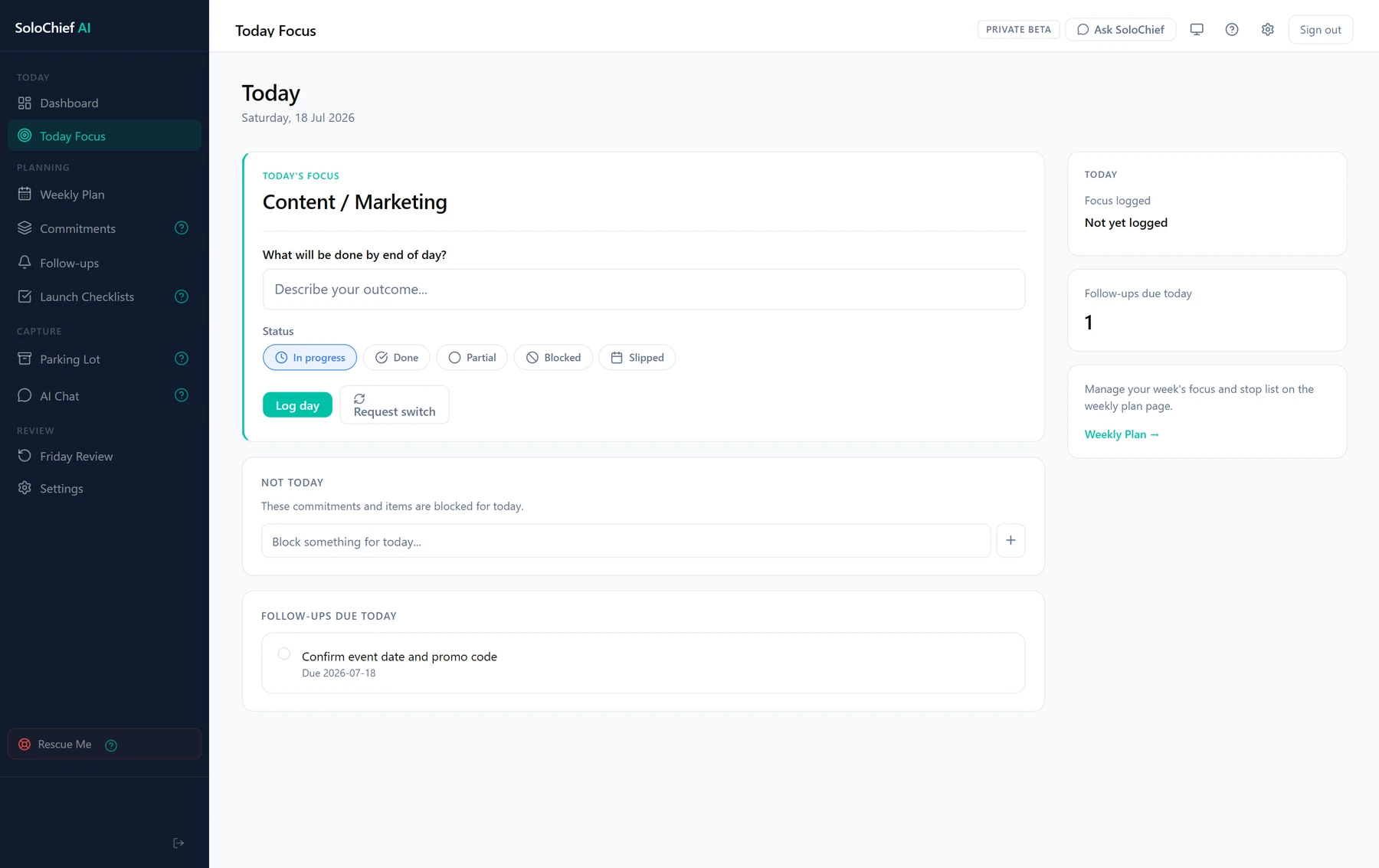
SoloChief Today Focus screen showing today's one outcome marked in progress, status controls to log the day or request a switch, a Not Today list for blocking work, and follow-ups due today

Keep open commitments visible until resolved.

  • Follow-up Tracker
  • Due dates
  • Email reminders
  • WhatsApp reminders on Pro
  • Overdue visibility
Both Free and Pro

In practice: An overdue follow-up surfaces again in the next Friday Review.
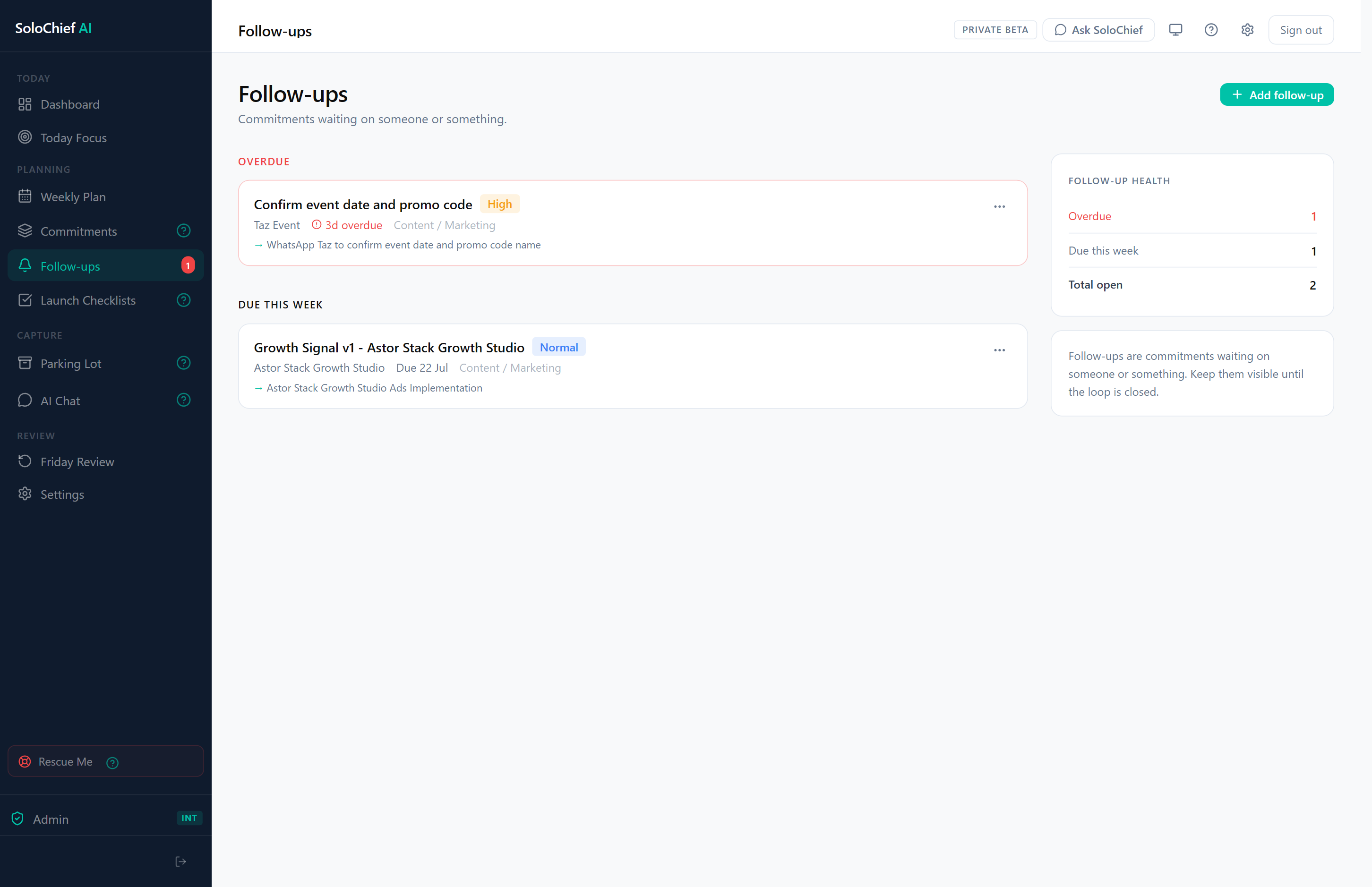
SoloChief Follow-ups screen showing an overdue follow-up flagged high priority, one follow-up due this week, and a Follow-up Health summary counting overdue, due-this-week and total open items

Close the week with what actually happened.

  • Friday Review
  • Weekly carryovers
  • Slipped work
  • Completed outcomes
  • Rescue Me
Web Free and Pro

In practice: Unfinished outcomes stay visible in your review, ready to carry into next week's plan. WhatsApp can remind you when it is time to begin your review.
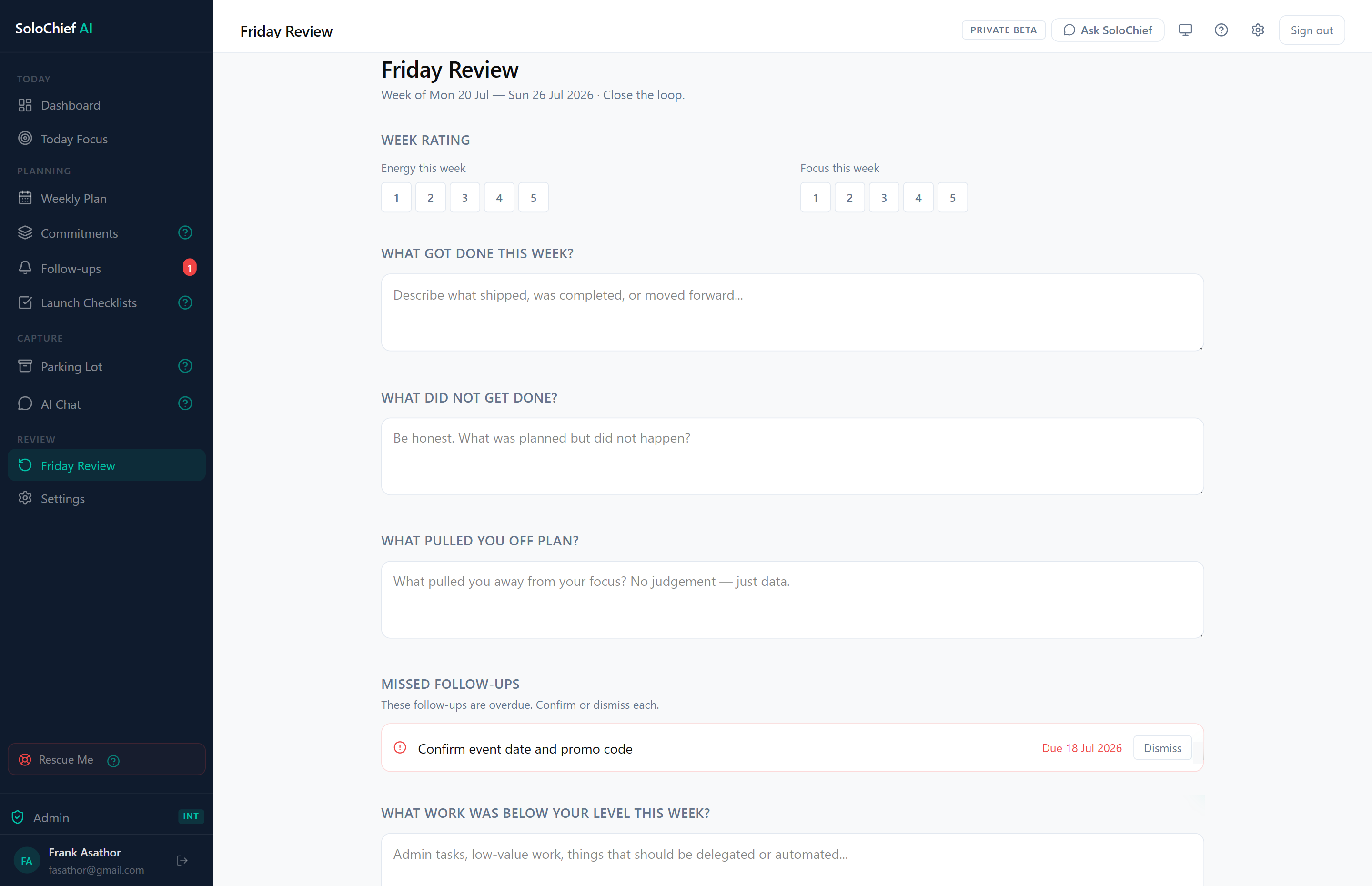
SoloChief Friday Review screen showing week rating sliders for energy and focus, prompts for what got done, what did not, and what pulled you off plan, and a Missed Follow-ups section flagging an overdue item during review
Capabilities

Everything working together.

SoloChief connects planning, focus, follow-through, review and communication in one weekly operating system.

Plan the week Web · Free
  • Weekly Plan Set the week's focus and outcomes.
  • Main focus Name the week's one real commitment.
  • Three weekly outcomes Define what done looks like.
  • Stop List Decide what this week skips.
  • Lock plan Confirm the week's plan is set.
Protect today Web · Free
  • Today Focus One clear focus and outcome each day.
  • Switch Challenge Log when today's priority changes and why.
  • Progress updates Log done, blocked, slipped or switched.
  • Blocked / partial / slipped status Records exactly how far work got.
  • Parking Lot Capture distractions without losing focus.
  • Rescue Me A structured next move when overwhelmed.
Follow through Web · Free
  • Follow-up Tracker Keeps promises and replies from going cold.
  • Follow-up due dates A date so nothing relies on memory.
  • Email reminders Nudges before a follow-up goes quiet.
  • WhatsApp reminders The same nudge in WhatsApp. WhatsAppPro
Review and reset Web · Free
  • Friday Review Close the week knowing what moved and slipped.
  • Weekly carryovers See what is still open from last week.
  • Progress reflection See the week's pattern, not just its list.
  • Review reminders A prompt to close the week.
AI and communication WhatsApp · Pro
  • AI Chat Ask about your work and next move. WebFree
  • Pocket Chief The operating rhythm, in WhatsApp.
  • WhatsApp commands Reply done, blocked or park directly.
  • Morning Brief Focus, priorities and follow-ups each morning.
  • Proactive check-ins A check-in when things go quiet.
  • Voice-note logging Log updates by voice note. WhatsAppOperator
Account and control Web · Free
  • Usage visibility See where you stand at a glance.
  • Plan controls Upgrade, downgrade or manage billing.
  • Account settings Manage sign-in and preferences.
  • Communication preferences Choose how SoloChief reaches you. Web and WhatsAppComing later
  • Quiet hours Pause proactive WhatsApp messages during set hours. WhatsAppPro
What makes SoloChief different

It protects the week you planned.

SoloChief enforces an operating rhythm rather than acting as another passive task list — it pushes back on the week, instead of just recording it.

01

Protects the plan

SoloChief does not treat the plan as disposable. Distractions can be parked without replacing the current focus, and switching takes a deliberate step rather than a silent edit.

Switch Challenge
02

Carries the week with you

Pocket Chief brings briefs, reminders and quick updates into WhatsApp so the operating rhythm does not depend on reopening a dashboard.

Pocket Chief · Pro
03

Keeps open loops visible

Follow-ups, commitments and stalled work remain visible until they are resolved, moved or deliberately closed.

Follow-up Tracker
04

Helps you recover

When the day breaks down, Rescue Me helps identify what can still move instead of forcing the original plan.

Rescue Me
See it in action

The week, stage by stage.

Select a stage to see the real SoloChief screen behind it.

Build the week.

Commitments, deadlines and follow-ups become one realistic weekly plan, locked before the week takes over.

Weekly Plan · Command Center

SoloChief Weekly Plan screen showing this week's main focus commitment, three outcome fields, an empty stop list, and the planning rules that keep the week to one focus and three outcomes

Protect today.

One outcome stays clear while the day changes — switch requests and blocked work never quietly replace it.

Today Focus · Command Center

SoloChief Today Focus screen showing today's one outcome marked in progress, status controls to log the day or request a switch, a Not Today list for blocking work, and follow-ups due today

Keep loops closed.

Every follow-up carries a due date and a reminder, so replies, payments and decisions stop going cold.

Follow-up Tracker · Web and WhatsApp

SoloChief Follow-ups screen showing an overdue follow-up flagged high priority, one follow-up due this week, and a Follow-up Health summary counting overdue, due-this-week and total open items

Close the week.

Friday Review brings completions, slipped work and carryovers together, so next week starts with context.

Friday Review · Command Center

SoloChief Friday Review screen showing week rating sliders for energy and focus, prompts for what got done, what did not, and what pulled you off plan, and a Missed Follow-ups section flagging an overdue item during review
SoloChief works as one system

Run the week with less rebuilding.

Plan on the web. Carry the plan into WhatsApp. Keep focus, follow-ups and review connected.